
I prefer CLI
I prefer CLI

I prefer CLI

Why? Multi-tenant environments. First, we need to understand a few differences between environments:

  • End-user UI
  • Agent Runtime Environment
  • LLM Server

So

  • When you run Claude Code on your local MacBook, the first two are always local. The third is usually the Claude.ai server.
  • When you ssh to a virtual private server (VPS) and install Claude Code there, the first two are your remote server. The third is still the Claude.ai server.
  • When you run Claude RC on your virtual private server and code from your iPad using the Claude app, the end-user UI is on your iPad, the agent runtime environment is on your VPS, and the server is still Claude.ai.

Most people physically separate their tenancy, such as Claude Code, from their personal vs. work laptops. So in most cases, it's not a big deal.

But when you need multi-tenancy, it becomes super stressful. For example, say you have two different toolkits:

  • personal toolkits (personal Notion, personal Sentry, personal Linear)
  • workplace toolkits (company Notion, company Sentry, company Linear)

Most MCP auth states or code harnesses don't support profiles, so you can only log in to one.

So therefore... a natural evolution was to have both:

  • a personal VPS with all personal toolkits set up
  • a workplace VPS with all workspace toolkits set up

to physically isolate tenancies.

Now we've solved the multiple-profile issue, but the client's problems persist. Now let's get back to the environments:

  • End-user UI
  • Agent Runtime Environment
  • LLM Server

All MCP auth or toolkit auth info should always be saved in the Agent Runtime Environment IMHO. However, a surprising number of harnesses tie them to the LLM server (such as Codex Apps or Claude.ai Plugins) or put them in the end-user UI (Claude Desktop or Codex Desktop).

Now the problem is:

  • If the auth data is put on the LLM server, you cannot reuse LLM accounts across tenants
  • If the auth data is put on the end-user UI, you cannot use the same app to access multi-tenants.

The only way to reliably isolate different auth information is thus:

  • You ssh to a virtual private server (VPS) and run Claude Code there. Never use LLM server plugins.

Then

  • End-user UI
  • Agent Runtime Environment

are both isolated VPS, and

  • LLM Server holds no information on the tenancy

This way, you can provide different toolkits, creating multiple dev environments.
Backlinks (1)
  • 260619
Debian Setup
Debian Setup

Debian Setup

sudo apt update && sudo apt install git && /bin/bash -c "$(curl -fsSL https://raw.githubusercontent.com/Homebrew/install/HEAD/install.sh)" && echo >> ~/.bashrc && echo 'eval "$(/home/linuxbrew/.linuxbrew/bin/brew shellenv bash)"' >> ~/.bashrc && eval "$(/home/linuxbrew/.linuxbrew/bin/brew shellenv bash)" && sudo apt-get install build-essential && brew install gcc btop
Backlinks (1)
  • 260415
Satori
Satori

Satori

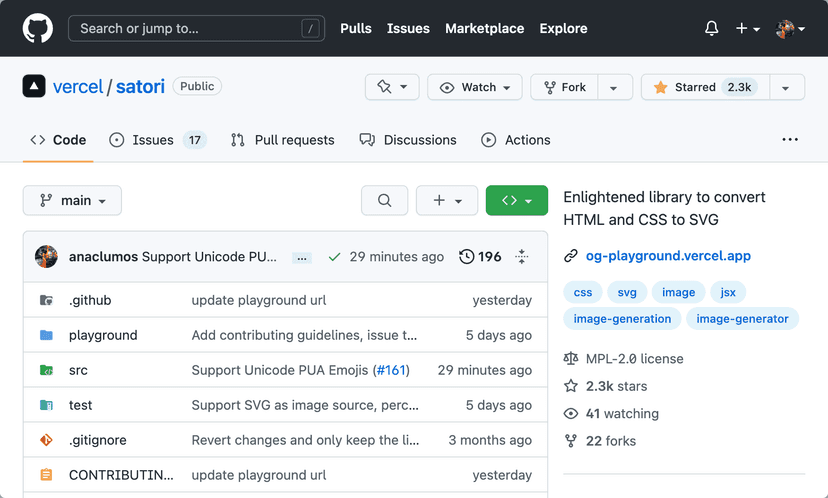
ALT: Add Unicode Private Area Support #161 Merged

Merged! Add Unicode Private Area Support #161

Resources

  • Create OG images for your blog with Next.js

Introducing OG Image Generation: Fast, dynamic social card images at the Edge - Vercel

  • This approach is 5x faster than existing solutions by using Vercel Edge Functions, WebAssembly, and a brand new core library for converting HTML/CSS into SVGs.
  • We released og-image.vercel.app four years ago to enable developers to dynamically generate open graph (OG) images by taking a screenshot of an HTML page inside of a Serverless Function
  • Indeed, I also used this for a while. anaclumos/cho-sh-og-image: Open Graph Image as a Service. Open Graph Image as a Service

Problems

  • Difficult: This solution required launching Chromium in a Serverless Function and taking a screenshot of the given HTML page with Puppeteer. Setting up these tools was hard to implement and often led to errors
  • Slow: Chromium needs to be compressed to fit inside a Serverless Function and then decompressed on a cold boot; it's very slow (~4 seconds on average). This can result in slow or broken social card images
  • Expensive: Spinning up an entire browser to take a screenshot was not efficient. This led to large Function sizes, which could be expensive and waste computing
  • Large: Chromium has continued growing in the past four years. Today, it's too large to fit in a Serverless Function

@vercel/og

  • Easy: No headless browser is needed. Using Vercel OG, you can define your images using HTML and CSS and automatically generate dynamic images from the generated SVGs
  • Affordable: Vercel Edge Functions are ~160x cheaper than running Chromium in a Serverless Function. Further, generated images can be cached and stored at the Edge
  • Fast: Vercel OG (500KB) is 100x more lightweight than Chromium + Puppeteer (50MB). 5x faster in P99 TTFB (4.96s → 0.99s) and 5.3x faster in P90 (4s → 0.75s).

Features

  • Basic CSS layout, styling, and typography.
  • Works with any framework or frontend application
  • Font and Emoji Subsets from Google Fonts and other CDNs
  • Tailwind CSS with the tw prop
  • Handles Cache automatically

Engine

  • The core engine, Satori, can be used in modern browsers, Node.js, and Web Workers. Building on top of the core engine, Vercel OG can be used inside Edge environments through WebAssembly to create social card images easily.

Backstory by Shu

  • Stories Behind Satori
Backlinks (6)
  • Embeddable GitHub Repo Card But It Looks Great
  • 221114
  • Stories Behind Satori
  • 221011
  • Letter to the Heptabase Team on 2022-10-11
  • WebAssembly
Index
cho.sh
I prefer CLIBB9A08260619260619컴퓨트로늄37A88F컴퓨트로늄0CF03F컴퓨트로늄2C60FB260618260618260418260418260528260528AutoBuilder63849A260419260419Setup9AC296StellaD226F7260415260415Debian SetupD2F701260414260414anaclumos/configs/AGENTS.mdED86A3Ramp의 AX (회사를 AI로 물들이는 법)840774260413260413How to get your company AI pilled46544C260411260411260409260409260407260407260406260406Separating Claude Code Personal Sub and Claude Code Company Sub33A53C
sudo apt update && sudo apt install git && /bin/bash -c "$(curl -fsSL https://raw.githubusercontent.com/Homebrew/install/HEAD/install.sh)" && echo >> ~/.bashrc && echo 'eval "$(/home/linuxbrew/.linuxbrew/bin/brew shellenv bash)"' >> ~/.bashrc && eval "$(/home/linuxbrew/.linuxbrew/bin/brew shellenv bash)" && sudo apt-get install build-essential && brew install gcc btop
Warning
This post is more than a year old. Information may be outdated.