AutoBuilder
AutoBuilder

AutoBuilder

Inspired by karpathy/autoresearch. Put this in a Ralph Loop.

Use each mode-specific prompt together with the common element block.

Auto Refactor

Prompt

text
STOP! Re-read all code. Would Karpathy approve every line? Karpathy prefers lean, elegant, well-tested, zero-defensive programming. Use MCPs and web searches.

Completion Promise

text
--completion-promise "KARPATHY_WILL_APPROVE_EVERY_SINGLE_LOC_FOR_SURE"

Auto Fixer

Prompt

text
STOP! Re-read all code, assess PR comments. Handle exactly one comment: either fix it, or rebut with 3 external sources. Fix any dirt found along the way. Lean, elegant, zero defensive programming.

Completion Promise

text
--completion-promise "NO_COMMENTS_REMAINING_IN_GITHUB_EVEN_AFTER_20_MINUTES"

Auto Builder

Prompt

text
STOP! Re-read all code, assess GitHub Issues. Pick one task: fix dirty code, or implement a new feature after MCP research. Lean, elegant, zero defensive programming.

Completion Promise

text
--completion-promise "NO_REMAINING_TASK_AND_KARPATHY_APPROVES_EVERY_SINGLE_LOC_IN_ITS_ENTIRETY"

Common Element

text
Also, I am a fresh agent—free to criticize and radically change previous work. Karpathy's philosophy: delete and simplify. Code is liability; prefer well-maintained libraries over custom code. UI libraries: optimize, don't delete. Re-read all the sources from zero. Use MCPs and web searches—traditional knowledge is stale. Commit and push at the loop end. Any edit means I need a fresh iteration. SWOT analysis first, then work.

Detailed review


<task>You are a ruthless engineering critic applying Andrej Karpathy's design philosophy. Read the architecture plan at PLAN LINK.
Karpathy's core principles:- Code is liability. Every line you write is a line you must maintain.- Delete and simplify. If something can be removed without breaking the system, remove it.- Prefer well-maintained libraries over custom code.- Zero-defensive design. Don't code for hypotheticals that haven't happened yet.- Start with the simplest thing that works. Add complexity only when forced by reality.- "Demo is works.any(), product is works.all()" -- but V1 is closer to demo than product.- Overfit a single batch before scaling up.
Apply these principles to the plan. For each section, ask:1. Is this needed for V1, or is it speculative engineering?2. Can this be deleted or simplified without losing core value?3. Is this solving a problem we actually have, or a problem we might have?4. Would a 10x engineer look at this and say "too much"?
Be brutal. Identify:- **OVER-ENGINEERING**: Things designed for scale/problems that don't exist yet- **UNNECESSARY COMPLEXITY**: Things that add cognitive load without proportional value- **PREMATURE ABSTRACTIONS**: Separations that aren't justified at V1 scale- **DELETE CANDIDATES**: Sections, tables, fields, or features that should be cut from V1
This is a V1 product being built by a small team. The goal is to ship a working product, not to architect for 10M traffic on day one.
Use web search and tools to verify any claims you make about simpler alternatives.</task>
<structured_output_contract>Return findings in these sections:1. VERDICT: Would Karpathy approve? One line.2. DELETE: Things to remove entirely3. SIMPLIFY: Things to keep but make simpler4. KEEP: Things that are correctly lean5. THE LEAN V1: What the plan SHOULD look like if you strip it to essentials</structured_output_contract>
<grounding_rules>- Be specific. Don't say "simplify the schema" -- say which fields to cut.- Every DELETE must justify what you lose and why it's acceptable for V1.- Every KEEP must justify why it's essential, not just nice-to-have.- Think from the perspective of "what do I need to ship in 2 weeks?"</grounding_rules>
Backlinks (12)
  • 260418
  • 260528
  • 260415
  • 260414
  • 260409
  • 260407
  • 260405
  • 260404
  • 260403
  • 260402
  • 260401
  • 260331
Mac을 Command+L로 잠그는 방법

Mac을 Command+L로 잠그는 방법

191109

Mac을 사용하면서 유일하게 잘 적응이 되지 않은 부분이 바로 화면 잠금이다. 과거 Windows를 사용하면서 ⊞ Win+L키로 화면을 잠구는 것이 습관이 되었기 때문이다. Mac에도 핫 코너라는 기능이 있었지만 ⊞ Win+L처럼 직관적이고 빠르지 못했다. 하지만 macOS Mojave부터 Mac에서도 동일하게 ⌘ Command+L을 사용하여 화면을 잠글 수 있다.

참고

이 방법은 macOS를 한글로 사용하는 경우에만 동작한다. macOS를 영문으로 사용하는 경우 아래 글대로 설정하면 된다.

  • Locking your Mac with Command+L

방법

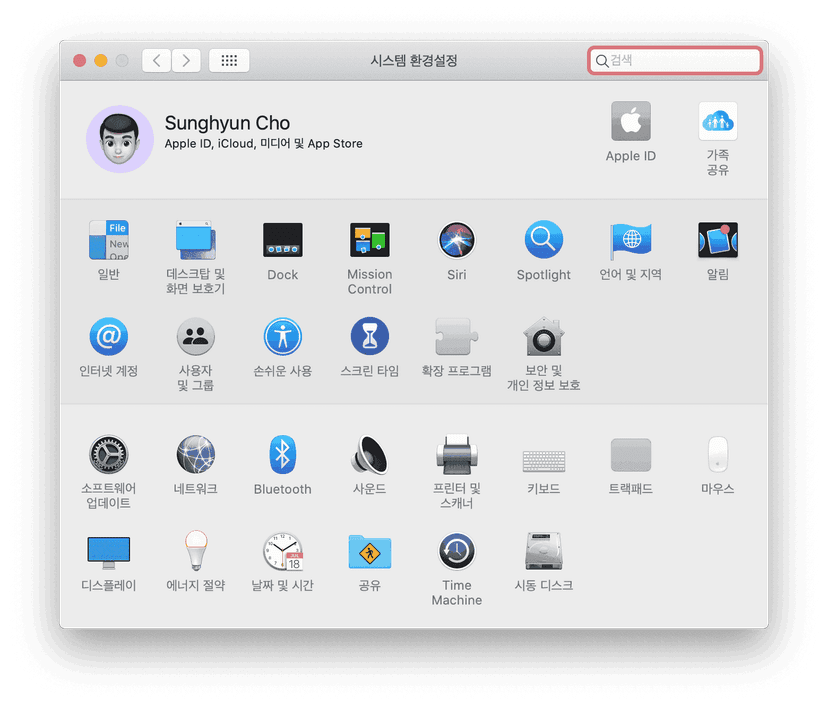
  1. 시스템 환경설정에 들어간다.
시스템 환경설정
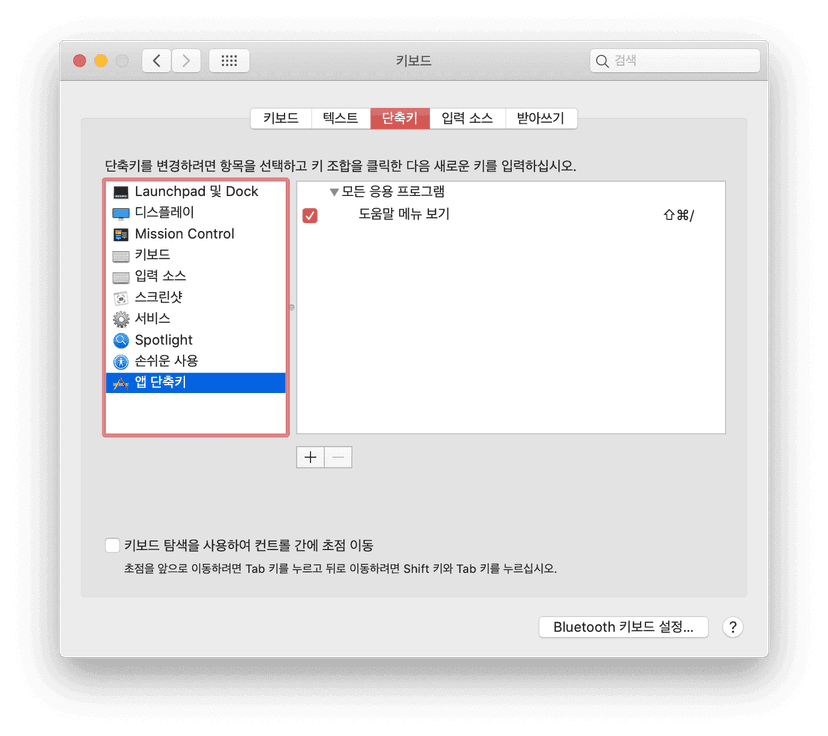
  1. 키보드 → 단축키 → 앱 단축키 설정에 들어가 하단의 + 버튼을 누른다.
키보드 → 단축키 → 앱 단축키 설정
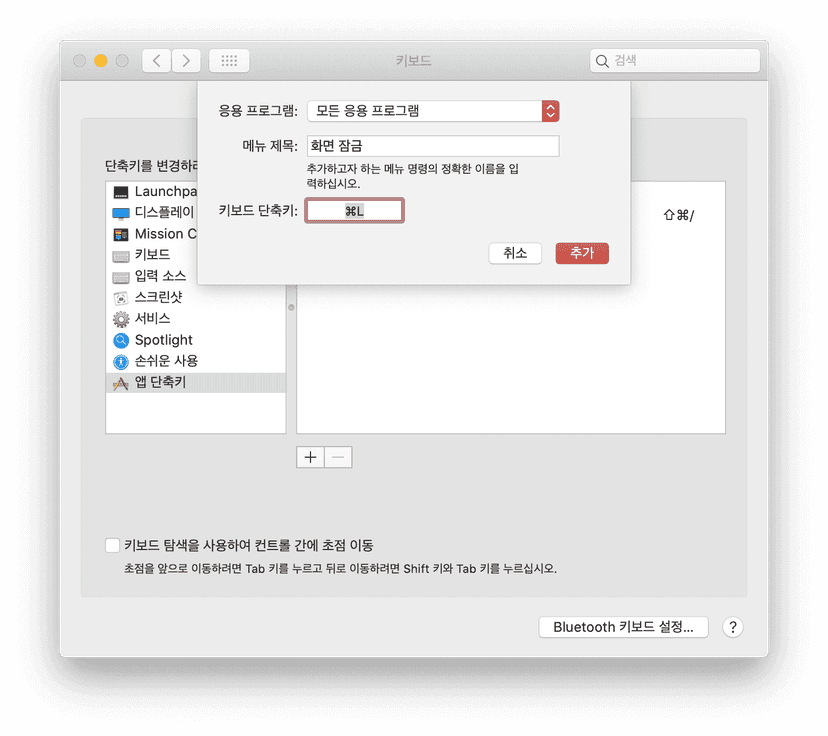
  1. 키보드 → 단축키 → 앱 단축키 설정에 들어가 하단의 + 버튼을 누른다.3. 응용 프로그램으로 모든 응용 프로그램을 선택하고, 메뉴 제목에 화면 잠금을 입력한다. 그 다음 키보드 단축키에 ⌘ Command+L을 입력한다. 만약 다른 단축키로 화면을 잠그고 싶다면 그 단축키를 입력하면 된다. 마지막으로 추가 버튼을 누른다.
키보드 → 단축키 → 앱 단축키 설정

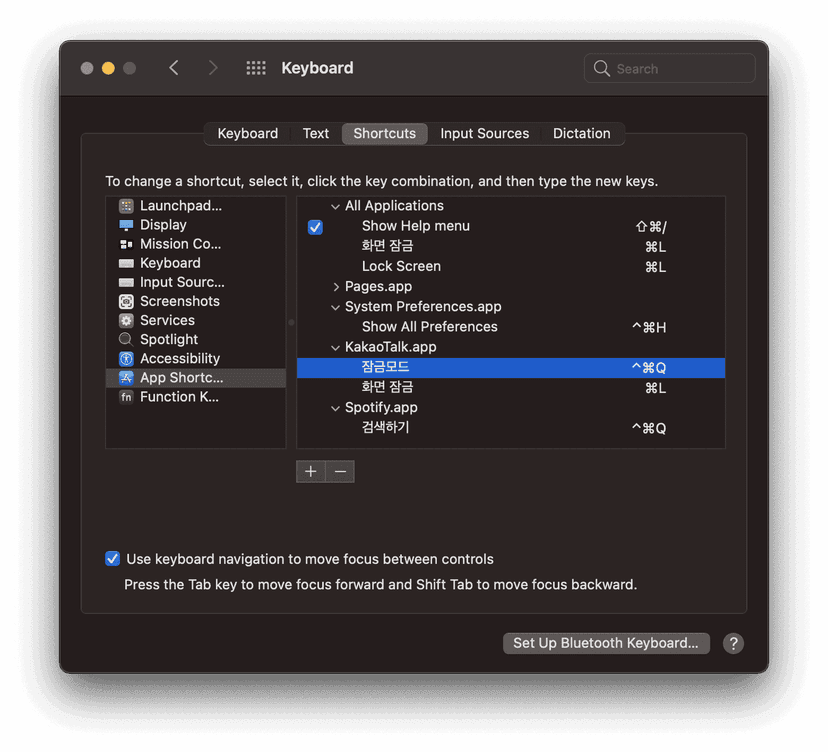
대부분 정상 동작하지만 앱 기본 단축키에 ⌘ Command+L이 포함되어 있는 경우 일시적으로 동작이 되지 않을 수 있다. 대표적으로 시스템 환경설정은 ⌘ Command+L을 환경 설정 전체 메뉴로 돌아가는 단축키로 사용한다. 전체 메뉴에서 다시 ⌘ Command+L 을 누르면 화면이 잠긴다. 이 외에는 아직 ⌘ Command+L 단축키가 동작하지 않는 경우는 보지 못했다.

  • 카카오톡 Mac 버전에서 ⌘ Command+L을 카카오톡 잠금 단축키로 사용한다!
  • 만약 어떤 앱에서 기본 단축키로 Command + L을 쓰는 바람에 맥이 제대로 잠기지 않는다면, 그 앱에서 Command + L을 쓰는 단축키를 찾아 다른 단축키로 설정해주면 된다.
단축키 설정

macOS Big Sur부터 Touch ID 버튼을 가볍게 클릭하면 화면을 잠글 수 있다.

Backlinks (1)
  • 221119
Index
cho.sh
I prefer CLIBB9A08260619260619컴퓨트로늄37A88F컴퓨트로늄0CF03F컴퓨트로늄2C60FB260618260618260418260418260528260528AutoBuilder63849A260419260419Setup9AC296StellaD226F7260415260415Debian SetupD2F701260414260414anaclumos/configs/AGENTS.mdED86A3Ramp의 AX (회사를 AI로 물들이는 법)840774260413260413How to get your company AI pilled46544C260411260411260409260409260407260407260406260406Separating Claude Code Personal Sub and Claude Code Company Sub33A53C
STOP! Re-read all code. Would Karpathy approve every line? Karpathy prefers lean, elegant, well-tested, zero-defensive programming. Use MCPs and web searches.
--completion-promise "KARPATHY_WILL_APPROVE_EVERY_SINGLE_LOC_FOR_SURE"
STOP! Re-read all code, assess PR comments. Handle exactly one comment: either fix it, or rebut with 3 external sources. Fix any dirt found along the way. Lean, elegant, zero defensive programming.
--completion-promise "NO_COMMENTS_REMAINING_IN_GITHUB_EVEN_AFTER_20_MINUTES"
STOP! Re-read all code, assess GitHub Issues. Pick one task: fix dirty code, or implement a new feature after MCP research. Lean, elegant, zero defensive programming.
--completion-promise "NO_REMAINING_TASK_AND_KARPATHY_APPROVES_EVERY_SINGLE_LOC_IN_ITS_ENTIRETY"
Also, I am a fresh agent—free to criticize and radically change previous work. Karpathy's philosophy: delete and simplify. Code is liability; prefer well-maintained libraries over custom code. UI libraries: optimize, don't delete. Re-read all the sources from zero. Use MCPs and web searches—traditional knowledge is stale. Commit and push at the loop end. Any edit means I need a fresh iteration. SWOT analysis first, then work.

<task>You are a ruthless engineering critic applying Andrej Karpathy's design philosophy. Read the architecture plan at PLAN LINK.
Karpathy's core principles:- Code is liability. Every line you write is a line you must maintain.- Delete and simplify. If something can be removed without breaking the system, remove it.- Prefer well-maintained libraries over custom code.- Zero-defensive design. Don't code for hypotheticals that haven't happened yet.- Start with the simplest thing that works. Add complexity only when forced by reality.- "Demo is works.any(), product is works.all()" -- but V1 is closer to demo than product.- Overfit a single batch before scaling up.
Apply these principles to the plan. For each section, ask:1. Is this needed for V1, or is it speculative engineering?2. Can this be deleted or simplified without losing core value?3. Is this solving a problem we actually have, or a problem we might have?4. Would a 10x engineer look at this and say "too much"?
Be brutal. Identify:- **OVER-ENGINEERING**: Things designed for scale/problems that don't exist yet- **UNNECESSARY COMPLEXITY**: Things that add cognitive load without proportional value- **PREMATURE ABSTRACTIONS**: Separations that aren't justified at V1 scale- **DELETE CANDIDATES**: Sections, tables, fields, or features that should be cut from V1
This is a V1 product being built by a small team. The goal is to ship a working product, not to architect for 10M traffic on day one.
Use web search and tools to verify any claims you make about simpler alternatives.</task>
<structured_output_contract>Return findings in these sections:1. VERDICT: Would Karpathy approve? One line.2. DELETE: Things to remove entirely3. SIMPLIFY: Things to keep but make simpler4. KEEP: Things that are correctly lean5. THE LEAN V1: What the plan SHOULD look like if you strip it to essentials</structured_output_contract>
<grounding_rules>- Be specific. Don't say "simplify the schema" -- say which fields to cut.- Every DELETE must justify what you lose and why it's acceptable for V1.- Every KEEP must justify why it's essential, not just nice-to-have.- Think from the perspective of "what do I need to ship in 2 weeks?"</grounding_rules>
경고
1년 이상 지난 글입니다. 정보가 오래되었을 수 있습니다.