Rubik's Cube
Time limit1sMemory limit128 MB
Simulate Rubik's Cube face turns from an unfolded starting state and print the final facelet colors in the same layout.
- Level
Medium5 of 10
- Topics
- Simulation, Implementation, Matrix, Array
- Solved
- No attempts yet
Problem
You have found an old Rubik's Cube and decide to write a program that records its state and simulates the turns you make.
A Rubik's Cube is covered with 54 small square areas called facelets — 9 facelets on each of its six sides. Every facelet has one color. When the cube is solved, all nine facelets on a side share the same color; the six colors of the original cube are red, yellow, green, blue, white and orange.

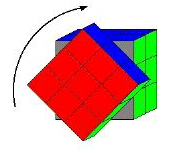
Figure 1: Turning the front side.
You rearrange the facelets by turning the sides of the cube. Turning one side moves nine little cubes, together with their attached facelets, into a new position (see Figure 1).
Given a starting state and a list of turns, determine the color of every facelet after all the turns have been performed.
Input
The first line contains the number of scenarios. Each scenario has two parts: the starting state of the cube, followed by the turns to perform.
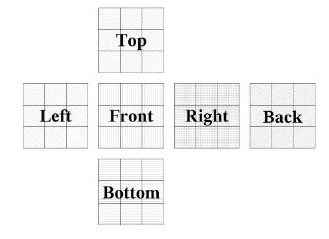
Starting state. Colors are single characters (one character per facelet, separated by single blanks) laid out as an unfolded cube (see Figure 2). From top to bottom:
- three lines for the top side, each indented by six blanks so that it sits directly above the front side;
- three lines listing the left, front, right and back sides next to each other (their rows are concatenated with a single blank as separator), giving twelve characters per line;
- three lines for the bottom side, indented just like the top side.

Figure 2: Folding pattern used for both input and output.
Turns. This part starts with a line containing the number of turns (). Each of the next lines contains two integers and separated by a single blank. The value selects the side to turn, numbered left , front , right , back , top , bottom . The value is the direction: for clockwise and for counterclockwise, as seen by a viewer looking directly at side .
Output
For each scenario, print a line Scenario #i:, where is the scenario number starting at , followed by the resulting state of the cube in exactly the same layout used for the input. Separate consecutive scenarios with a single blank line.