Encrypted SMS
InterviewTime limit1sMemory limit128 MB
Each encrypted letter was shifted forward within its phone keypad key by its 1-based position; given the ciphertext, recover the original password.
- Level
Easy3 of 10
- Topics
- String, Simulation, Implementation
- Solved
- No attempts yet
Problem
The scientific committee members discuss the problems over email and exchange password-protected compressed files. Because email is not a secure channel, the password of each file is sent over SMS, and to make it safer the password is encrypted before it is sent. The encryption is built on the multi-tap text-entry method used on old mobile phones.
With multi-tap you press a key one or more times to type a letter. On any key the first letter takes 1 press, the second takes 2 presses, the third takes 3 presses, and so on. For example, pressing key 2 once gives A, twice gives B, and three times gives C.
The keypad places the 26 letters on keys 2 through 9:
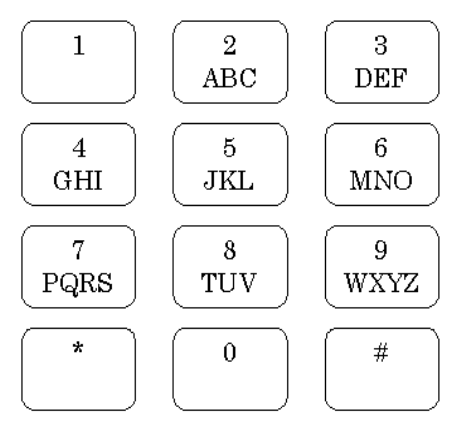
To encrypt the -th character of the password (positions are counted from ), take the key that produces that character and press it more times than that character normally needs. Presses that go past the last letter on a key wrap around to that key's first letter, so the presses cycle within the same key. The letter you land on is the encrypted character, and it has the same case (uppercase or lowercase) as the original character. For example, if the 4th character of the password is U, then key 8 (which holds T, U, V) is pressed times; cycling T→U→V→T→U→V, the 6th press lands on V, so U is encrypted to V.
Given an encrypted password, recover the original password.
Input
The input consists of several test cases. Each test case is a single line containing one encrypted password: a non-empty string of at most 100 English letters (uppercase or lowercase). The input ends with a line that contains only a single #.
Output
For each test case, print the decrypted (original) password on its own line. Passwords are case-sensitive, so keep the exact case of every letter.