Gears on a Board
Time limit1sMemory limit128 MB
Determine each gear's rotation direction and speed from the motor, propagating through same-level ring contacts, and report overlap or conflicting rotation errors.
- Level
Medium7 of 10
- Topics
- Graph, BFS, Geometry, Simulation
- Solved
- No attempts yet
Problem
An engineering firm, "Gears R Us," needs a program that evaluates how gears turn on a board. The board is a two-dimensional mounting plane. Every gear has two levels of teeth: an inner level (the ring closest to the board, of radius ) and an outer level (the ring farther from the board, of radius ). A gear rotates about the center of its axle, and both of its levels always share the same angular velocity.
Two gears interact only when a ring of one gear exactly touches a ring of the other at the same level -- inner touches inner, or outer touches outer. Where they touch, the two rings have equal tangential velocity, so the driven gear turns in the opposite direction to the gear driving it. Because tangential velocity is shared at the contact point, a gear spinning at angular velocity through a ring of radius drives a ring of radius at angular velocity .
Boards are square, with a grid of mounting holes on 1 cm centers. The lower-left hole is and the upper-right hole is . Gears mount only on holes, and each radius is an integer from 1 to 100. The motor is the only source of power on a board; it is powered from behind the board but is otherwise an ordinary gear subject to every rule above.
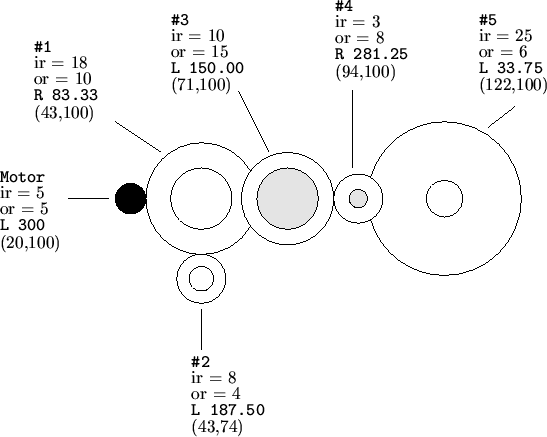
Your program must also detect two error conditions. An overlap error occurs when two or more gears would overlap at their inner rings or at their outer rings (touching exactly is allowed; overlapping is not). A conflict error occurs when some gear is driven at two or more different speeds or directions -- it is perfectly valid, though, for several gears to drive one gear at the same speed and in the same direction. If both errors are present, report the overlap error.
A gear that is not connected to the motor never turns (rotation ); report this as an idle-gear warning.
Input
The input contains an undetermined number of configurations, one after another, until end of file.
Each configuration begins with a line of six integers:
- -- the motor's coordinates ();
- -- the motor's inner and outer radii ();
- -- the motor's rotational speed in RPM (; negative means counter-clockwise, positive means clockwise);
- -- the number of gears on the board, excluding the motor ().
Each of the next lines describes one gear, gear 1 through gear in order, with four integers: (its coordinates, ) and (its inner and outer radii, ).
Output
For each configuration, print a result block.
The first line is Simulation #X, where X is the configuration number starting from 1 (the number begins in column 13, immediately after Simulation #).
If there is no error, print one line for each gear, gear 1 through gear :
- the gear number, right-justified in columns 1-2;
- a colon
:in column 3; - in column 5,
Lif the gear turns counter-clockwise orRif it turns clockwise; - from column 7, the magnitude of the rotation in RPM, always printed with exactly two digits after the decimal point.
If a gear's rotation magnitude is zero, print Warning -- Idle Gear starting in column 5 instead of the direction and magnitude.
If there is an error, print only the Simulation #X line followed by exactly one error message, starting in column 1: Error -- Overlapping Gears for an overlap, or Error -- Conflicting Gear Rotation for a conflict. The overlap error takes precedence.
Print one blank line after each configuration's block.