Virtual Keyboard Typing
Time limit4sMemory limit256 MB
Find the fewest arrow and select presses that type the given text on a sliding-cursor virtual keyboard, including the final Enter.
- Level
Medium7 of 10
- Topics
- Dynamic programming, Shortest path, BFS
- Solved
- No attempts yet
Problem
The left half of Figure 1 shows a 4x7 virtual keyboard. The user cannot press the keys of the virtual keyboard directly and has to use the five hardware buttons on the right instead. A cursor starts on the top left key of the virtual keyboard, and the four arrow buttons move it. One press of an arrow button moves the cursor in that direction until a different character appears. If no different character lies in that direction, the cursor stays where it is. Pressing the select (SEL) button while the cursor sits on a key appends that character to the end of the text. The user types the characters of the text this way, and to finish the text the user has to find the Enter key and select it.
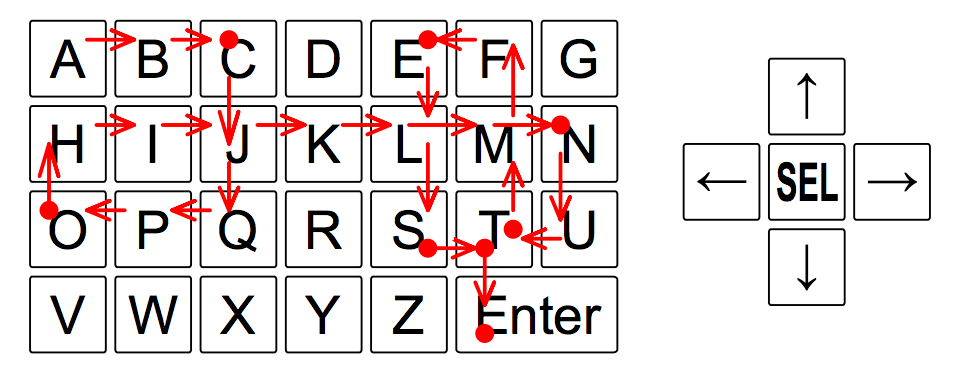
Figure 1. A virtual keyboard and the hardware buttons
Figure 1 shows how to type the text CONTEST on this keyboard. The arrows trace the path the cursor takes while the arrow buttons are pressed, and the dots mark the keys where the select button is pressed. Typing CONTEST takes 30 button presses.
You are given the layout of a virtual keyboard and a text. Find the smallest number of button presses that types the text.
Input
The first line contains two integers and (), the number of rows and columns of the virtual keyboard grid. Each of the next lines describes one row of the keyboard and holds characters. Every character is an uppercase letter, a digit, a dash (-), or an asterisk (*), and the asterisk stands for Enter. Only one key carries any given character. Each key covers one or more grid squares and always forms a connected region. The last line contains the text to type. The text is a string of at most 10,000 characters, contains no asterisk, and is not empty. The given text can be typed on the given virtual keyboard.
Output
Print the smallest number of button presses that types the whole text, including the Enter at the end.