Window Manager
Time limit2sMemory limit256 MB
Simulate a phone window manager that opens, closes, resizes, and moves non-overlapping rectangles with cascading pushes and reports errors.
- Level
Medium6 of 10
- Topics
- Simulation, Geometry
- Solved
- No attempts yet
Problem
Touch screens changed how people work with computers. One idea that shows up again and again in touch interfaces is that objects on the display move as if they obeyed physical laws. This problem asks you to implement one example of that.
Write a simulator for the window manager of a phone. The screen is a rectangle that fully contains zero or more rectangular windows. No window crosses a screen boundary and no two windows overlap. The simulator supports four commands.
OPEN x y w h: open a new window whose top-left corner is at , with width pixels and height pixels.CLOSE x y: close the open window that contains the pixel at . A user can tap anywhere on a window to close it.RESIZE x y w h: set the size of the window that contains the pixel at to width and height . The top-left corner does not move.MOVE x y dx dy: move the window that contains the pixel at by pixels horizontally or by pixels vertically. At most one of and is non-zero.
OPEN and RESIZE succeed only when the resulting window overlaps no other window and stays inside the screen. MOVE moves the window by as many of the requested pixels as it can. If is 30 but the window can only travel 15 pixels to the right, it travels 15 pixels.
A moving window can bump into another window. When that happens it pushes the other window in the same direction as far as needed, the way physical objects behave. The effect cascades: a pushed window that meets a further window pushes that one too. Figure 1 shows three windows where window A moves to the right and carries the other two along.
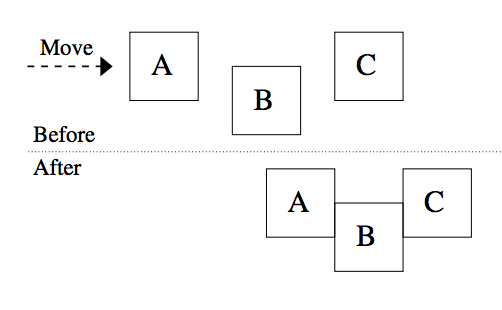
Figure 1: a MOVE that pushes two windows
Input
The first line contains two positive integers and , the horizontal and vertical size of the screen in pixels. Each is at most . The top-left pixel of the screen has coordinates .
Each of the following lines holds one command as described above. One or more spaces separate the command name and its parameters. The parameters are integers with , , , and . There are at most 256 commands.
Output
Simulate the commands in the order they appear in the input. Commands are numbered from 1. If an error turns up while a command is simulated, print one line with the command number, the command name, and the first message from the list below that applies, then ignore the result of that command apart from the exception noted for MOVE. The line has this form.
Command N: NAME - message
no window at given position, forCLOSE,RESIZE, andMOVE, when no window contains the pixel at the given position.window does not fit, forOPENandRESIZE, when the resulting window would overlap another window or cross a screen boundary.moved d' instead of d, forMOVE, when the command asked to move a window pixels but the window could only move pixels before some window would have to cross a screen boundary. and are the absolute numbers of pixels requested and moved. The window still moves in this case, but only the shorter distance.
After every command has been simulated and every error message has been printed, print the number of windows that are still open on a line of this form.
k window(s):
Then print one line per open window, in the order the windows were opened, holding the coordinates and of the top-left corner, the width, and the height, separated by single spaces.