Paint bucket
InterviewTime limit2sMemory limit512 MB
Flood fill a grid from one pixel, repainting all side-connected pixels sharing the clicked color with a new color, then print the grid.
Problem

One of the biggest time savers when you draw on a computer is the paint bucket, also called bucket fill.
When you pick this tool and click a pixel of the image, every pixel that has the same color as the clicked pixel and is connected to it gets painted with the new color. Two pixels are connected when they share a side, or when a path of connected pixels joins them.
Look at the picture below. If you click the orange pixel in the center, the whole region turns orange. Pixels are not connected diagonally, so two corners of the image stay white.

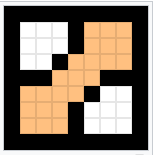
You are given a matrix of digits that represents the pixels. Simulate a bucket fill applied to one given pixel. A color is a single digit from 0 to 9.
Input
The first line contains two integers and , the number of rows and the number of columns of the image.
Each of the next lines contains digits, the initial colors of the pixels.
The last line contains three integers , and . and are the row and the column of the pixel where the fill is applied, counted from 0, and is the color to paint with.
The image is smaller than 1000 x 1000 pixels.
Every color is a single digit from 0 to 9.
Output
Print the image after the fill, in the same format as the input: lines of digits each.