Attaching Stickers
InterviewTime limit2sMemory limit512 MB
Place each sticker in order on a rectangular laptop, trying rotations 0, 90, 180, 270 and picking the topmost then leftmost valid spot; output the total filled cells.
- Level
Medium5 of 10
- Topics
- Simulation, Implementation, Brute force, Matrix
- Solved
- No attempts yet
Problem
Hye-yoon has received many stickers that can be attached to a laptop while participating in various contests. A sticker is printed on a square grid, and every cell of the sticker is connected to its neighbors up, down, left, and right. The size of the grid exactly matches the size of the sticker, so there are no unnecessary rows or columns at the top, bottom, left, or right that contain no part of the sticker.
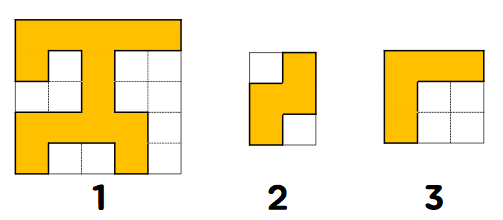
Below is an example of a valid grid. Orange cells are cells with the sticker attached, and white cells are cells without the sticker.
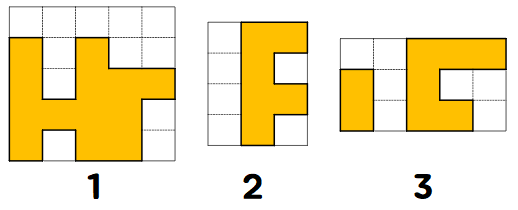
On the other hand, the following are examples of invalid grids. The first has an unnecessary row at the top, and the second has an unnecessary column on the left. The third has cells of the sticker that are not all connected up, down, left, and right.
Hye-yoon has decided to attach these stickers to her laptop. Her laptop happens to be rectangular, and a grid is drawn on it at the same spacing as the grid on which the stickers are printed. Hye-yoon will attach the stickers in the order she received them, aligning them to the grid.
The way Hye-yoon attaches a sticker is as follows.
- Take the sticker off its grid without rotating it.
- Find a position where the sticker can be attached without overlapping another sticker or going outside the laptop. Since Hye-yoon wants to fill the laptop starting from the top, if there are multiple positions where the sticker can be attached, she chooses the topmost position. If there are multiple topmost positions, she chooses the leftmost one among them.
- Attach the sticker at the chosen position. If there is no position where the sticker can be attached at all, rotate the sticker 90 degrees clockwise and repeat step 2.
- If the sticker cannot be attached even after repeating the above process four times, trying rotations of 0, 90, 180, and 270 degrees, discard the sticker without attaching it.
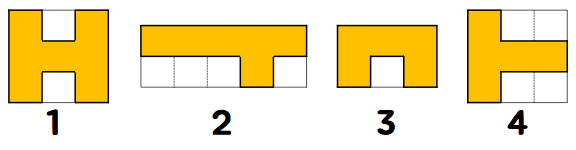
Let us understand the process of attaching stickers through the example below. The laptop is 5 cells tall and 4 cells wide, and the stickers Hye-yoon has are shown below. She will attach the stickers from left to right.
-
The first sticker can be attached without rotation in 6 positions, as shown below.
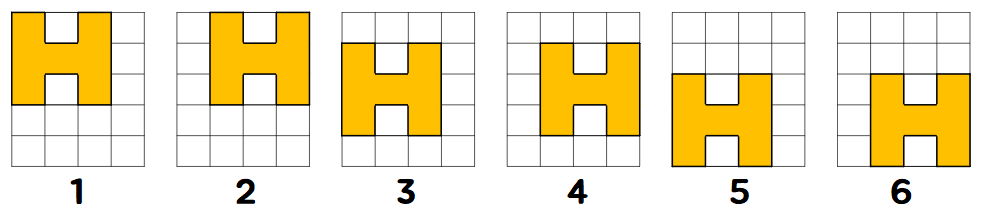
Among these, the topmost position, and if there are multiple possible topmost positions, the leftmost among them, is the first one. After attaching the sticker, the laptop looks like the image below.
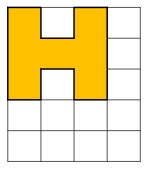
-
The second sticker has no position where it can be attached without rotation. However, after rotating it 90 degrees clockwise, one position where it can be attached appears. After attaching the sticker at that position, the laptop looks like the image below.
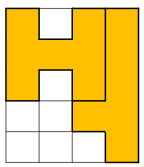
-
The third sticker has no position where it can be attached, even after checking all of its shapes rotated 0, 90, 180, and 270 degrees clockwise. Therefore, she discards the sticker without attaching it.
-
The fourth sticker has no position where it can be attached without rotation, nor after rotating it 0, 90, or 180 degrees clockwise. However, after rotating it 270 degrees clockwise, one position appears. After attaching the sticker, the laptop looks like the image below. In the end, 18 cells of the laptop are filled with stickers.
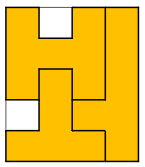
Hye-yoon became curious about what her laptop looks like after attaching all the stickers. Given the size of the laptop and the stickers, find how many cells of the laptop are filled after attaching the stickers in order.
Input
The first line contains N (1 ≤ N ≤ 40) and M (1 ≤ M ≤ 40), representing the height and width of the laptop, and the number of stickers K (1 ≤ K ≤ 100), separated by a single space.
From the next line onward, information about the K stickers is given. Each sticker is given in the following format.
First, Ri (1 ≤ Ri ≤ 10) and Ci (1 ≤ Ci ≤ 10), representing the number of rows and columns of the grid on which the i-th sticker is printed, are given separated by a single space.
The next Ri lines each contain Ci integers representing each row of the grid, separated by a single space. The value in each cell is 0 or 1. 0 means a cell without the sticker attached, and 1 means a cell with the sticker attached.
As explained in the problem, all stickers are printed on valid grids. Specifically, every cell of a sticker is connected to its neighbors up, down, left, and right, and the size of the grid exactly matches the size of the sticker, so there are no unnecessary rows or columns at the top, bottom, left, or right that contain no part of the sticker.
Output
On the first line, output the number of cells of the laptop with a sticker attached after attaching the given stickers in order.