x
Time limit3sMemory limit512 MB
Find all valid cells after marking circular-reference cells invalid, propagating invalidity along references, and applying rectangle merges.
- Level
Medium7 of 10
- Topics
- Graph, DFS, Implementation
- Solved
- No attempts yet
Problem
Jooheon has been studying Excel hard lately. Impressed by how Excel works, he decided to build his own spreadsheet program similar to it. Since he wrote it himself, some of its behavior differs from Excel.
In a spreadsheet, each rectangular grid square is called a cell. Each cell's position is written as a coordinate. The column part is written as uppercase letters, and the row part is written as a positive integer. Columns go A, B, C, D, ..., Z in order as the index increases. After Z comes AA, then AB, AC, ..., AZ, BA, BB, BC, ..., BZ, CA, CB, ..., ZZ. This is a base-26 system that uses the 26 uppercase letters.
In this spreadsheet, a cell can be treated as a variable and used in a formula. This is called referencing the cell. When referencing cells forms a cycle, it is called a circular reference. A circular reference means the referenced cells depend on each other, so none of them can be referenced. Circular references can cause serious data problems, so the cells that form a circular reference are called invalid cells.
An invalid cell spreads to the cells that reference it. Even if a cell is not directly part of a circular reference, if at least one cell it references is invalid, that cell also becomes invalid. Cells changed this way are called propagated cells. Propagation happens in a chain, so a cell that references a propagated cell also becomes a propagated cell. Cells that remain valid after the whole process are called valid cells. For a cell to be valid, none of the cells it references may be invalid.
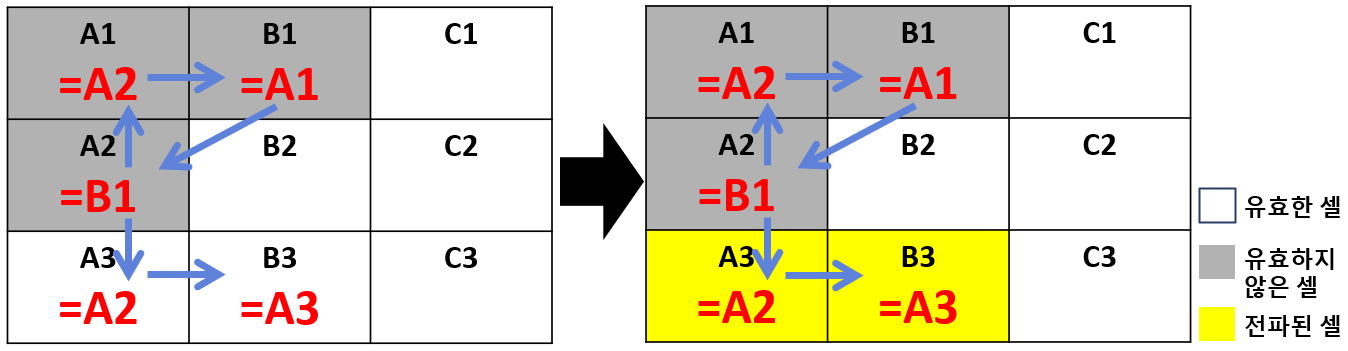
In <Figure 1>, [A1, B1, A2] forms a cycle, so it is a circular reference, and A1, B1, and A2 are invalid cells. A3 was valid at first, but A2 is invalid, so the invalid state propagates and A3 becomes a propagated cell. B3 references the propagated cell A3, so B3 also becomes a propagated cell.
After the process above is complete, a new feature called cell merging applies. Cell merging happens when these conditions hold:
-
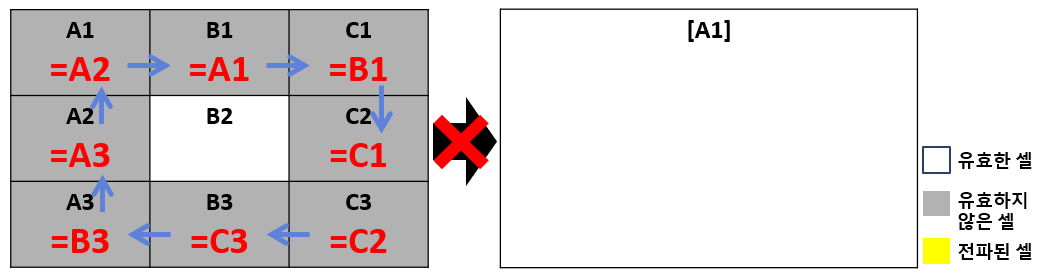
- The cells in a circular reference must form a perfect rectangle. A perfect rectangle means that when you select a continuous block of rows and columns, every cell inside it belongs to one circular reference.
-
- Every cell in the circular reference must take part in the merge.
-
- When conditions 1 and 2 are both met, the merge happens automatically.
-
- After the merge, the cells become one cell, and its coordinate becomes that of the top-left cell of the merged block.
After the merge, if no cell in the rectangle references an invalid cell, the merged cell becomes valid. If any cell in the rectangle references an invalid cell, the merged cell stays invalid. Turning a merged cell valid also happens in a chain. However, this does not propagate to the cells that directly form the circular reference.
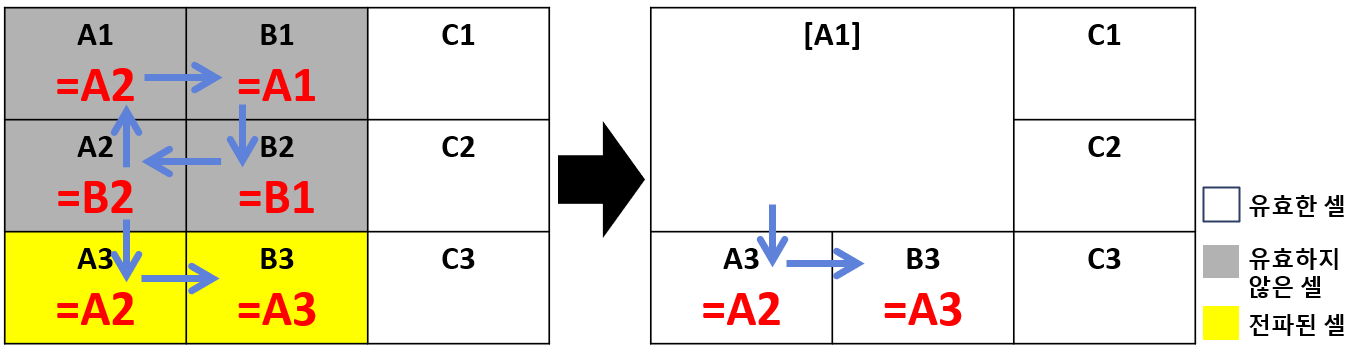
In <Figure 2>, A1, B1, A2, and B2 first form a circular reference, and A3 was a propagated cell because it references A2. Then A1, B1, A2, and B2 merge into a single cell A1. None of them referenced an invalid cell before the merge, so the merged cell becomes valid. A3, which references it, becomes valid as well, and B3 follows in the chain.
Given a spreadsheet of size R by C, along with the cells that each cell references, print the coordinates of all valid cells in lexicographic order.
In this problem, no cell references itself, and each cell may reference at most 2 different cells.
Input
The first line contains R and C (1 ≤ R ≤ 999, 1 ≤ C ≤ 702).
From the second line on, each line gives the cells that each cell of the spreadsheet references. Uppercase letters count from A as the first row, and integers count from 1 as the first column.
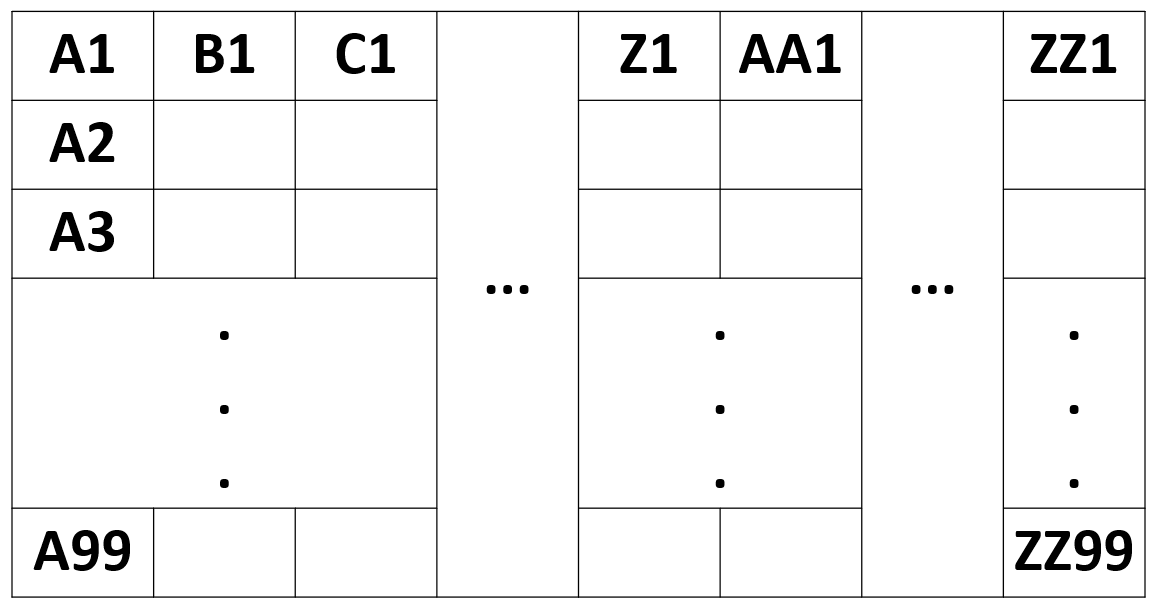
A cell coordinate is one or two uppercase letters followed by an integer from 1 to 999. The top-left cell is A1, the bottom-left cell is A999, the top-right cell is ZZ1, and the bottom-right cell is ZZ999 (see <Figure 9> in the hints).
If a cell references two cells, they are separated by +. If a cell references nothing, it is written as '.'.
No coordinate in the input is larger than the size of the sheet.
Output
On the first line, print the number of valid cells.
On the next line, print the coordinates of all valid cells in lexicographic order. The hints section explains lexicographic order.
Hints
-
The lexicographic order used in this problem follows these rules.
- Uppercase letters have A first, then B, C, D, ..., Z. For example, A999 must come before B1.
- Digits have 0 first, then 1, 2, ..., 9 in ascending order. For example, A11 must come before A2.
- When two strings have a letter in one position and a digit in the same position, the string with the digit comes first. For example, A11 must come before AA1.
- When one string is a substring of the other, the shorter string comes first. For example, A1 must come before A11.
Applying these rules, the strings [A11, AA1, A2, A1, B1] sort into [A1, A11, A2, AA1, B1].