Web Browser 2
InterviewTime limit1sMemory limit512 MB
Simulate a web browser with backward, forward, access, and compress operations, then print the current page and both history stacks.
- Level
Medium4 of 10
- Topics
- Simulation, Stack, Implementation, Linked list
- Solved
- No attempts yet
Problem
We use a 'web browser' to access web pages. A web browser has three main functions: Backward, Frontward, and Access.
When a user accesses a website, information about the web page is stored in the computer's cache space. When the backward or frontward function is used, the page information stored in the cache space is loaded. The web browser that Juheon developed has a curious feature called Compress. Compress reduces consecutive pages with the same number in the backward space into one.
Each function works as follows.
- When backward is executed
- Steps 2 and 3 run only when at least one page is stored in the backward space. When there are 0 pages, this operation is ignored.
- The web page currently being viewed is stored in the frontward space.
- The most recently visited page in the backward space is accessed. That page is then deleted from the backward space.
- When frontward is executed
- Steps 2 and 3 run only when at least one page is stored in the frontward space. When there are 0 pages, this operation is ignored.
- The page currently being viewed is stored in the backward space.
- The most recently visited page in the frontward space is accessed. That page is then deleted from the frontward space.
- When a web page is accessed
- All pages stored in the frontward space are deleted.
- The current page is added to the backward space, and the next page to access is updated to the current page. However, if this is the first time accessing a web page, the current page is not added to the backward space.
- When compress is executed
- In the backward space, if the same page number appears two or more times consecutively, only the most recent one is kept and the rest are deleted.
After all Q operations are finished, find the number of the currently accessed page and the numbers of the pages stored in the backward space and the frontward space.
In the initial state, both the backward space and the frontward space are empty, and no page is being accessed. Also, the same page number can be accessed multiple times, and in that case, even pages with the same number are treated as having different visit orders. In this problem, the computer's cache capacity is assumed to be large enough.
Input
The first line gives N, the number of types of web pages that can be accessed, and Q, the number of operations the user performs. (1 ≤ N, Q ≤ 2,000)
Starting from the second line, Q operations are given. Each operation means the following.
- B : execute backward.
- F : execute frontward.
- A i : access web page i.
- C : execute compress.
An A (access) operation appears at least once.
Output
Output over 3 lines.
On the first line, output the number of the currently accessed page.
On the second line, output the page numbers in the backward space in order from the most recently visited. If no page is stored, output -1.
On the third line, output the page numbers in the frontward space in order from the most recently visited. If no page is stored, output -1.
Hint
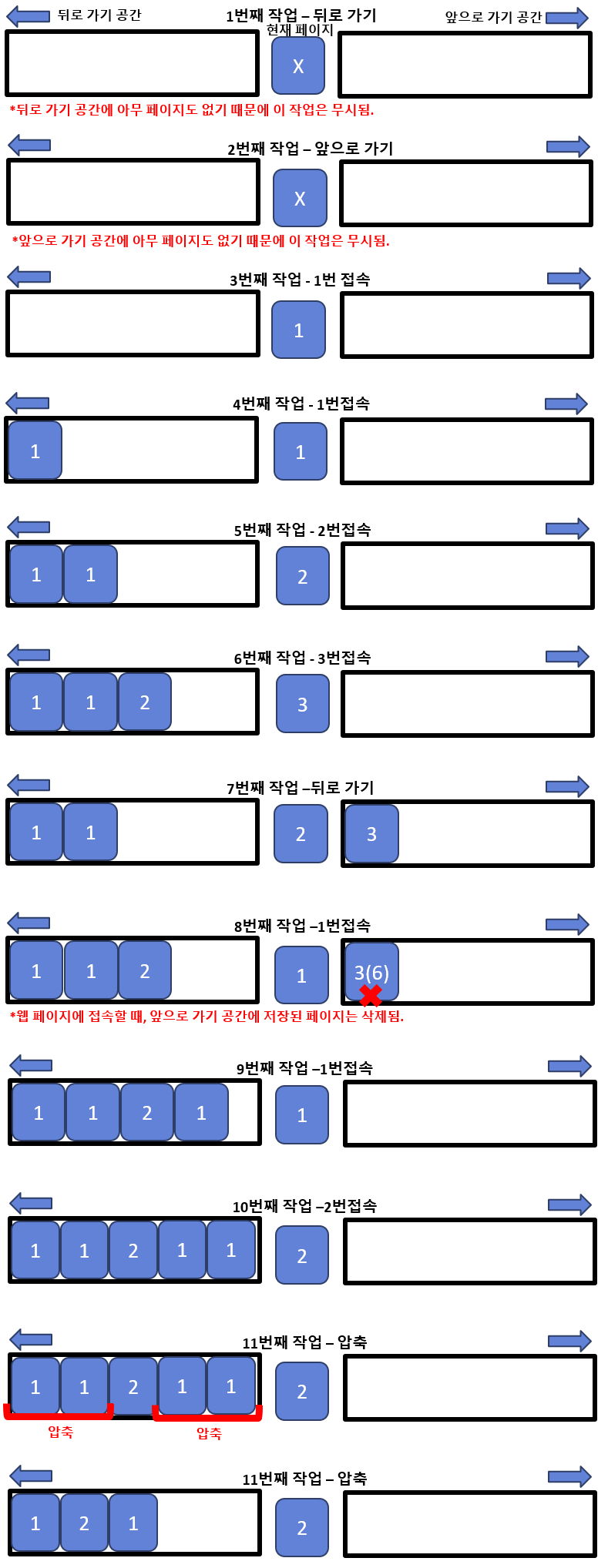
The figure below shows sample input 1.
The numbers inside the blue shapes represent page numbers.