260409
Backlinks (0)
No backlinks found.
 260409
No backlinks found.
I prefer CLIWhy? Multi-tenant environments. First, we need to understand a few differences between environments:
So
Most people physically separate their tenancy, such as Claude Code, from their personal vs. work laptops. So in most cases, it's not a big deal.
But when you need multi-tenancy, it becomes super stressful. For example, say you have two different toolkits:
Most MCP auth states or code harnesses don't support profiles, so you can only log in to one.
So therefore... a natural evolution was to have both:
to physically isolate tenancies.
Now we've solved the multiple-profile issue, but the client's problems persist. Now let's get back to the environments:
All MCP auth or toolkit auth info should always be saved in the Agent Runtime Environment IMHO. However, a surprising number of harnesses tie them to the LLM server (such as Codex Apps or Claude.ai Plugins) or put them in the end-user UI (Claude Desktop or Codex Desktop).
Now the problem is:
The only way to reliably isolate different auth information is thus:
Then
are both isolated VPS, and
This way, you can provide different toolkits, creating multiple dev environments.
Aldehyde Outage (January 23誠鉉)Multiple issues are combined.
useSyncExternalStore BugUsing Tabs will break with React 18 and Docusaurus v2.3 · Issue #8592 · facebook/docusaurus
On Cloudflare's side:
16:49:17.136 ✔ Server: Compiled successfully in 3.74m16:50:22.579 Segmentation fault16:50:22.595 Failed: build command exited with code: 13916:50:23.859 Failed: an internal error occurredOn Vercel's Side:
[success] [webpackbar] Server: Compiled successfully in 3.49mError: Command "yarn run build" exited with 129Why..? I changed no config
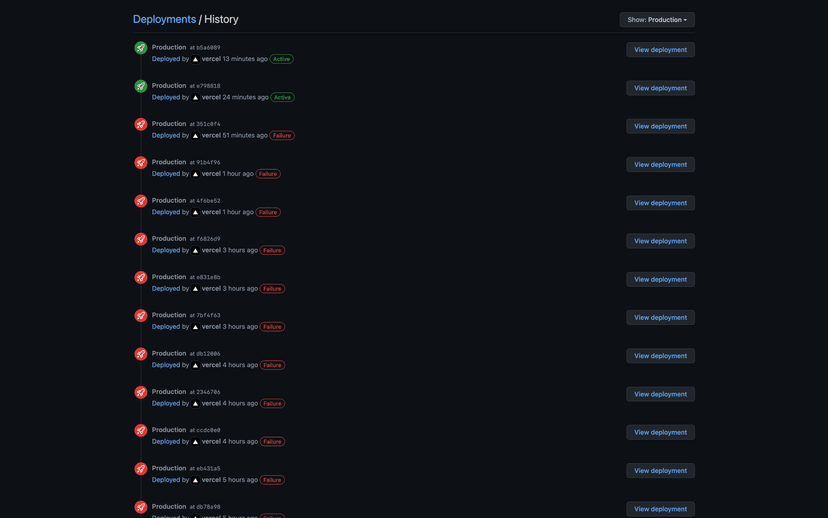
Investigating RAM Options. Supported a ticket to Cloudflare
--max-old-space-size=4096Did not help.
OH FIGURED IT OUT. It was because of insufficient RAM. When Docusaurus seals the assets (at the end of the build cycle), the RAM usage spikes to ~4.5 GB.
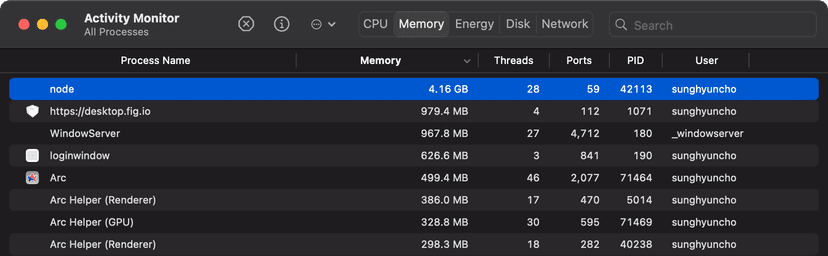
Configuring Cloudflare Pages and Vercel with the following argument fixed the problem!
--max-old-space-size=8192-- Nope. Did not solve the problem.
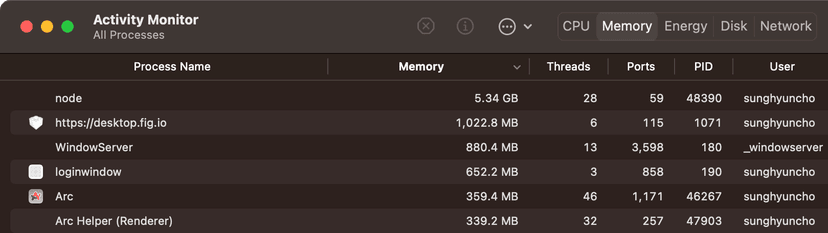
So I ended up using Cloudflare Wrangler to build on my device and then sending the build result to Cloudflare. Anyways, the issue seems to be resolved.
Index16:49:17.136 ✔ Server: Compiled successfully in 3.74m16:50:22.579 Segmentation fault16:50:22.595 Failed: build command exited with code: 13916:50:23.859 Failed: an internal error occurred[success] [webpackbar] Server: Compiled successfully in 3.49mError: Command "yarn run build" exited with 129--max-old-space-size=4096--max-old-space-size=8192